January 30th, 2026

This update marks an important step in how Nadoo is evolving β from a website builder to a platform for operating your business.
Nadoo started as a simple way to build websites. As more teams used Nadoo to run real businesses, we found that launching a site was just the beginning.
After going live, teams still needed to manage contracts, invoices, and business email β often across multiple tools. This created fragmented workflows and unnecessary operational overhead.
With this update, Nadoo evolves into a more connected platform where essential business tools work together in one place.
The AI Website Builder remains at the core of Nadoo.
β’ Faster and clearer AI-powered site creation
β’ AI-generated sections for faster page composition
β’ AI image generation to support initial page layout and visual setup
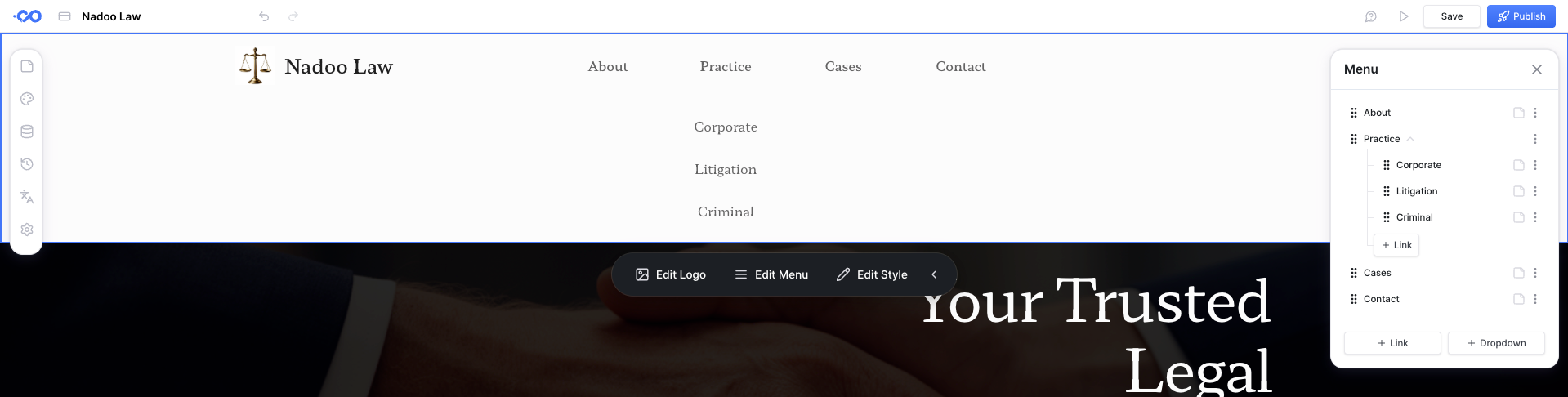
β’ Improved navigation and footer setup for easier brand configuration
You can continue building and managing websites as before β just more smoothly.
Create, send, sign, and manage contracts directly in Nadoo.
β’ Contract creation and delivery
β’ Digital signatures
β’ Centralized contract management
No more switching tools to handle agreements.
Manage invoices from creation to delivery in one place.
β’ Invoice generation
β’ Sending and status tracking
β’ Organized invoice management
Designed to work seamlessly with your website and customer data.
Use your own domain-based business email.
β’ Set up @yourcompany.com addresses
β’ Forward emails to your existing inbox
β’ Improve trust and professionalism in customer communication
These features are not standalone add-ons. They are connected by design, so everyday business tasks feel integrated instead of scattered across tools.
Nadoo is not focused on adding features for the sake of it. Our goal is to reduce operational friction as your business grows.
This update is the first major step in that direction. More improvements are coming, and weβll continue sharing whatβs next.
Nadoo continues to grow with customer feedback. If you have any suggestions or run into any issues, feel free to let us know. We'll keep improving your website building experience. π
January 9th, 2026

This update focuses on supporting global websites, improving content creation speed, and strengthening the stability that matters most for running your site.
You can now run your website in multiple languages.
Automatically translate your pages with AI
Add new languages with just one click
Track translation status for each page at a glance
Build a global website for international customers quickly and easily.
π‘ Multilingual support is available as an add-on for Starter plans and above.
We've updated section templates to help you build beautiful websites faster.
Hero sections for strong visual impact
Card and list-style content sections
Video sections with background video
Image gallery sections
Customer review sections
Carousel sections for sliding images and content
Logo marquee sections for showcasing partner brands
We've added 34 new section templates in total.
Add icons directly alongside your text
New video autoplay option
More reliable undo (history) feature
More intuitive menu navigation
We've improved editor usability based on customer feedback.
Stability is the most important part of any website builder.
With this update, customer app infrastructure has been separated and optimized, making your published sites faster and more reliable.
Faster page loading
Stable access even during high traffic
Reduced risk of downtime
Run high-traffic websites with confidence.
Nadoo.io continues to grow with customer feedback. If you have any suggestions or run into any issues, feel free to let us know. We'll keep improving your website building experience. π
November 21st, 2025

This update focuses on improving stability and user experience.
Customer app infrastructure has been separated to support more stable operations.
AI image generation has been improved. When an error occurs in one region, the system automatically tries another region, reducing image generation failure rates. Error messages are now displayed in multiple languages, making it easier for users to understand issues.
Page transitions in deployed apps are now smooth without flickering. Anchor link clicks scroll naturally, and all pages are accessible reliably.
Delete shortcuts for text component nodes now work more reliably. Accidental text deletion has been reduced.
Style flickering and breaking issues during page transitions in the editor have been reduced.
Transitions between edit mode and runtime mode are now smoother and more stable.
Page navigation settings have become more intuitive.
The Featurebase messenger automatically closes when mouse or touch events occur on the canvas. The messenger no longer blocks the screen during editing, keeping your workflow uninterrupted.
Login card padding has been reduced, allowing more efficient use of screen space on mobile devices.
We grows with your feedback.
You can report bugs or request features anytime through our feedback channels.
November 12th, 2025

This patch release is a small follow-up to the November 7, 2025 update.
Increased the reliability of Undo/Redo operations.
Reworked toolbar flip settings so tools stay visible without overlapping in tight spaces.
Expanded className/style token replacement exclusion rules and reinforced related tests to prevent unintended data substitutions.
Polished target detection and focus management in the inline editor and component editor to avoid state glitches during editing.
Refined the CSS style editor and color picker so they handle tokens more flexibly and keep state intact when selecting transparency.
Ensured the builder UI stack, style panel, deleted nodes, and inline editor state automatically restore after undoing history, keeping the editing flow uninterrupted.
Updated cursors on non-selectable canvas areas to cut down on unintended interactions.
Tuned mouse event hooks so cursor feedback and scroll control feel smoother when moving across non-selectable regions.
Refreshed preview labels for the interface builderβs image uploader/URL controls and updated English, Japanese, and Korean translations.
November 7th, 2025

Add Section buttons now stay visible across the canvas whenever nothing is selectedβjust tap one and the sections panel opens instantly, while headers and footers stay protected.
Freshly created components get a subtle glare highlight and auto-scroll into view. During ongoing operations the cursor briefly switches to a wait state to prevent accidental clicks.
Component toolbar controls and the color picker feel smoother and easier to use.
AI Image Generation now shows clearer status copy and streamlined loading feedback.
Real domain URLs appear directly in the Page and SEO preview cards, making pre-launch checks effortless.
Section templates and the style panel received a full polish, and style edits now land in history so you can roll back with confidence.
Global Font Awesome styles ensure icons render consistently throughout every page.
Dedicated loading spinners per node action plus unified operating-node state cut duplicate calls and sharpen responsiveness.
The style panel state, Redux reducers, and drag-and-drop paths were tuned so the editor stays light.
Sliding token refresh keeps long sessions authenticated without interruptions.
Translations now cover the interface builder, component toolbar, section templates, and guidance messages with tighter coverage; English safely serves as the fallback when needed.
Missing translations in AI Image Generation tabs, section templates, and helper messages were restored for a unified multilingual experience.
Navigation by section ID, post-duplicate/delete canvas states, and last-selected element resets all behave reliably again.
SEO updates reflect instantly, and TypeScript build errors are cleaned up.
Miscellaneous issuesβroot reducer initialization, navigation filtering, locale-dependent stringsβare resolved.
Subscription renewals now run through automated workflows with compliance tracking from start to finish.
The interface migration tool picked up DOM update support so operations teams can move faster.
October 22nd, 2025
New

You can now create stunning images from simple text descriptions.
AI turns your ideas into beautiful visuals instantly:
Describe what you want, and AI generates the image for you.
Enhance existing images with AI-powered upscaling and refinement.
Apply generated images directly to your design.
Free users get 5 generations per day, while paid users enjoy unlimited access during the beta period.
Go beyond a single page β build complete multi-page websites effortlessly.
Add or delete as many pages as you need.
When you rename a page, the menu updates automatically.
Build pages faster with professionally designed section templates.
Browse and add sections directly from the left panel.
Includes templates for FAQs, testimonials, contact forms, and more.
Drag and drop to reorder sections easily.
Edit the footer area freely for full design control.
Menu management just got a whole lot easier β navigation is now smarter and more intuitive.
Visualize your site structure with the new menu explorer.
Newly added pages automatically appear in the navigation menu.
Renaming a page updates the corresponding menu item instantly.
Hidden pages are automatically removed from the menu.
Text links: Adding links to text is now simpler.
List editing: Use floating buttons to quickly add list items.
Smooth animations: Panels now open and close with subtle, natural motion.
Loading speed: Improved reliability with CDN fallback.
Optimized styles: Pages load faster and feel smoother.
SEO settings: Auto-save applies your changes instantly while typing.
Locale support: Payment pages now display in the userβs preferred language.
Subscription modal: Subscription details are available in multiple languages.
Custom domains: Domain connections are now faster and more stable.
Weβve fixed several issues to make your experience more reliable:
Fixed an issue where pages could freeze when containing linked text.
Resolved a brief styling glitch when first opening a page.
Fixed display issues with the Iframe component.
Addressed an update delay after copying a node.
My Assets: Manage all your uploaded images and files in one place.
Text components now support nested elements.
Headers and footers automatically adjust for mobile layouts.
Complex components can now be edited directly from the right panel.
August 13th, 2025

Hey there!
Tired of asking, "Does building a website really have to be this hard?" We at Nadoo have finally done something about it!
Forget the endless quotes, the painful back-and-forth communication, and the months of waiting. With our new Nadoo AI Website Builder, you can turn your ideas into a stunning website in just a few minutes.
Just Tell the AI: Simply describe the vibe and content you want, and our AI will instantly create a stylish and professional website for you.
All You Need Is a Mouse: No coding knowledge is required! With just a few clicks, you can edit your content and launch your site to the world.
Get Found Everywhere: The websites our AI creates are loved by both search engines and AI engines, helping your business get discovered by more people.
Our beta service is live now. Give it a try and send us your honest feedbackβweβre ready to grow with your input!
AI-Powered SEO Content: A feature that automatically generates blog posts and content optimized for search engines.
Multi-Page Support: Go beyond a simple landing page and build a more comprehensive website with multiple pages.
We can't wait to grow with you.
Thanks, The Nadoo Team
Experience the new Nadoo β beautiful, fast, and simple.
π Get Started For Free Now